
Gas Pipeline Pressure Testing – Maximum Pressure Drop
Maximum pressure drop is performed by balancing changes in the measured pressure in the test section against the theoretical pressure changes calculated from changes in the measured temperature of the test section.
Ambient temperature swings can cause challenges regarding pressure changes. Temperature gauges must far enough away from exposed piping to avoid erroneous readings.
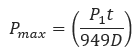
𝑃𝑚𝑎𝑥 − Maximum Pressure Drop[psi]
𝐷 − Internal Pipe Diameter[in]
𝑡 − Shut in Time[hr]
𝑃1 − Initial Test Pressure[psi]
Input Parameters
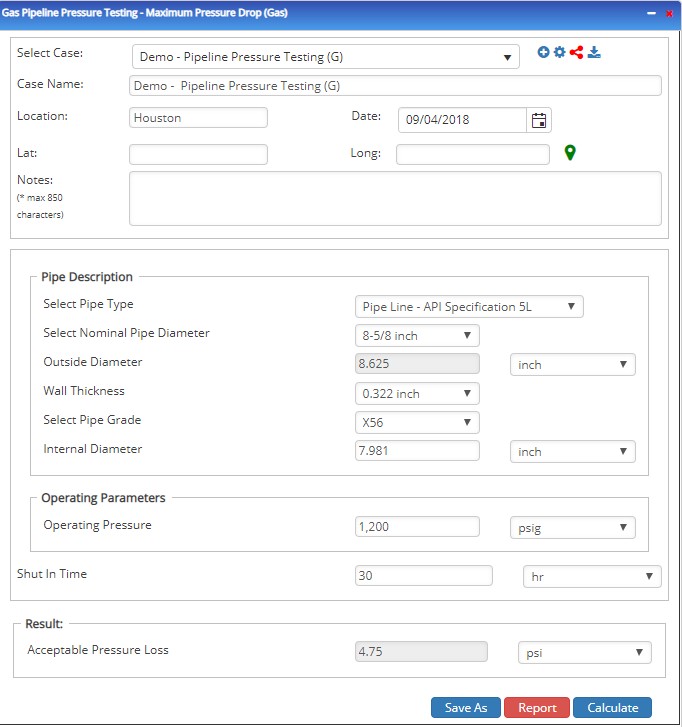
- To create a new case, click the “Add Case” button
- Select the Gas Pipeline Pressure Testing – Maximum Pressure Drop application from the Pipeline Testing module.
- Enter Case Name, Location, Date and any necessary notes.
- Fill out all required fields.
- Make sure the values you are inputting are in the correct units.
- Click the CALCULATE button.
- Initial Pressure(psi)
- Shut-in time(hr.)
- Internal pipe diameter(in)
Related Links
Table of Contents
Table of Pages
Table of Contents
- Pipeline HUB User Resources
- AC Mitigation PowerTool
- API Inspector's Toolbox
- Horizontal Directional Drilling PowerTool
- Crossings Workflow
- Hydrotest PowerTool
- Pipeline Toolbox
- Encroachment Manager
- PRCI AC Mitigation Toolbox
- PRCI RSTRENG
- RSTRENG+
- Ad-hoc Analysis
- Database Import
- Data Availability Dashboard
- ESRI Map
- Report Builder
- Crossings Workflow
- Hydrotest PowerTool
- Investigative Dig PowerTool
- Hydraulics PowerTool
- External Corrosion Direct Assessment Procedure - RSTRENG
- Canvas
- Definitions
- Pipe Schedule and Specifications Tables