
Purging Calculations
Find flow rate through the blow-off valve by using the formula for critical velocity,
Method A – Finding the flow rate through the blow off valve(s) using a modified Weymouth formula for critical velocity. Method B where pipe section is assumed to be filled with air prior to purge.
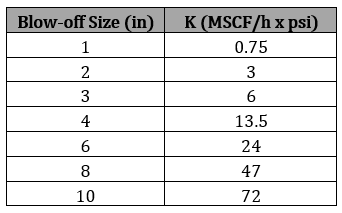
Blow off pressure should be between 18-20 psi and maintained. Blow off coefficient of valve must be known.
𝑄 = 𝐾(𝑃2)
where
𝑄 − Flow Rate[MSCFH]
𝐾 − Blowoff coefficient for standard sizes[MSCF/(h x psia)]
𝑃2 − Pressure just upstream of blowoff valve(recommended 18−20)[psia]
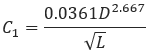
From rearranged Weymouth formula to find an estimate pressure value of necessary to maintain this flow rate:
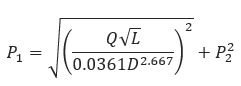
𝐿 − Length of Purge Section[mi]
𝐷 − Internal Pipe Diameter[in]
𝑃1 − Purge Gas Injection Pressure[psia]
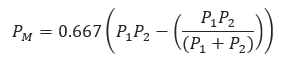
𝑃𝑀−Average Pressure[psia]
Method A
Recommended purge time is 2T. The minimum purge time in minute is
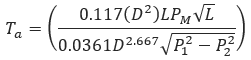
𝑇𝑎 − Minimum Purge Time[min]
𝑇𝑟𝑎 − Recommended Minimum Purge Time[min]
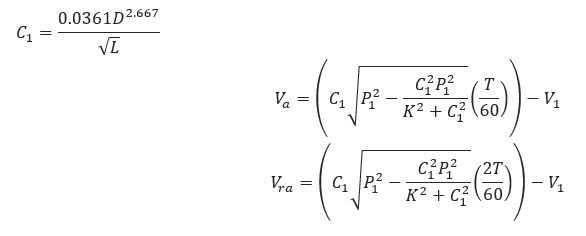
Where
𝑉𝑎 − Volume of Gas Lost − min time[MSCF]
𝑉1 − Actual Volume of Pipe Section−assume filled with air before purge[MCF].
𝑉𝑟𝑎 − Volume of Gas Lost−recommended time[MSCF]
Method B
Recommended purge time is 2T. The minimum purge time in minute is
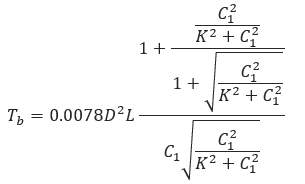
𝑇𝑏 − Minimum Purge Time[min]
𝑇𝑟𝑏 − Recommended Minimum Purge Time[min]
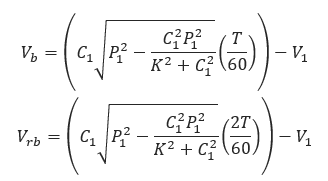
Where
𝑉𝑏 − Volume of Gas Lost−,min-time[MSCF]
𝑉1 − Actual Volume of Pipe Section−assume filled with air before purge[MCF]
𝑉𝑟𝑏 − Volume of Gas Lost−recommended time[MSCF]
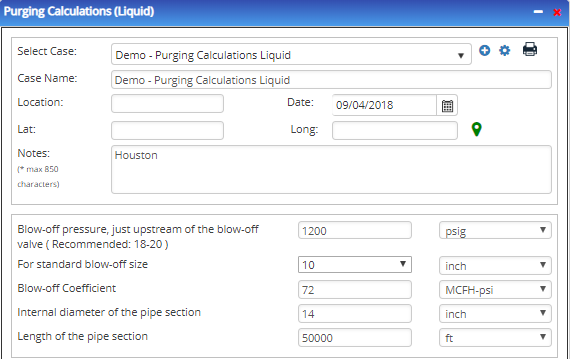
Input Parameters
- To create a new case, click the “Add Case” button
- Select the Purging Calculation application from the Pipeline Testing module.
- Enter Case Name, Location, Date and any necessary notes.
- Fill out all required fields.
- Make sure the values you are inputting are in the correct units.
- Click the CALCULATE button.
- Blow-off Pressure, just Upstream of the Blow-off Valve (Recommended 18-20) (psi)
- For standard blow-off size(in) (dropdown)
- Internal Diameter of Pipe Section(in)
- Length of Pipe Section(ft) (dropdown)
Outputs/Reports
- View the results.
- If an input parameter needs to be edited be sure to hit the CALCULATE button after the change.
- To SAVE, fill out all required case details then click the SAVE button.
- To rename an existing file, click the SAVE As button. Provide all case info then click SAVE.
- To generate a REPORT, click the REPORT button.
- The user may export the Case/Report by clicking the Export to Excel/PowerPoint icon.
- To delete a case, click the DELETE icon near the top of the widget.
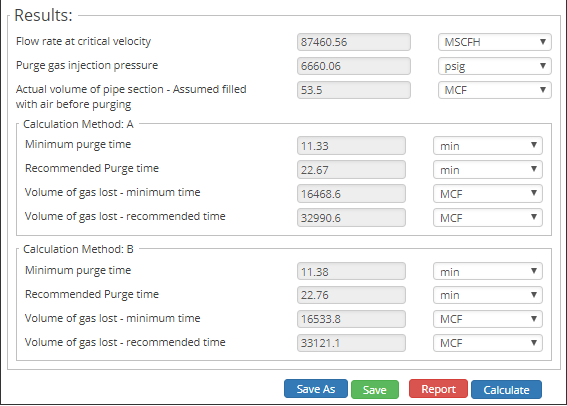
- Flowrate at Critical Velocity (MSCF)
- Purge Gas Injection Pressure(psi)
- Actual Volume of Pipe Section (assume filled with air before purging)(MCF)
Related Links
Table of Contents
Table of Pages
Table of Contents
- Pipeline HUB User Resources
- AC Mitigation PowerTool
- API Inspector's Toolbox
- Horizontal Directional Drilling PowerTool
- Crossings Workflow
- Hydrotest PowerTool
- Pipeline Toolbox
- Encroachment Manager
- PRCI AC Mitigation Toolbox
- PRCI RSTRENG
- RSTRENG+
- Ad-hoc Analysis
- Database Import
- Data Availability Dashboard
- ESRI Map
- Report Builder
- Crossings Workflow
- Hydrotest PowerTool
- Investigative Dig PowerTool
- Hydraulics PowerTool
- External Corrosion Direct Assessment Procedure - RSTRENG
- Canvas
- Definitions
- Pipe Schedule and Specifications Tables