
Wall Thickness Polyethylene Pipe
Wall thickness must meet minimum thickness in accordance to DOT 192.123.
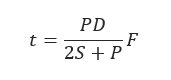
𝑃 = Internal pressure ,psi.
𝑆 = Hydrostatic Design Basis, ,psi.
𝐷 = Outside Diameter ,in.
𝑡 = Minimum Wall Thickness ,in.
𝐹 = Design Factor
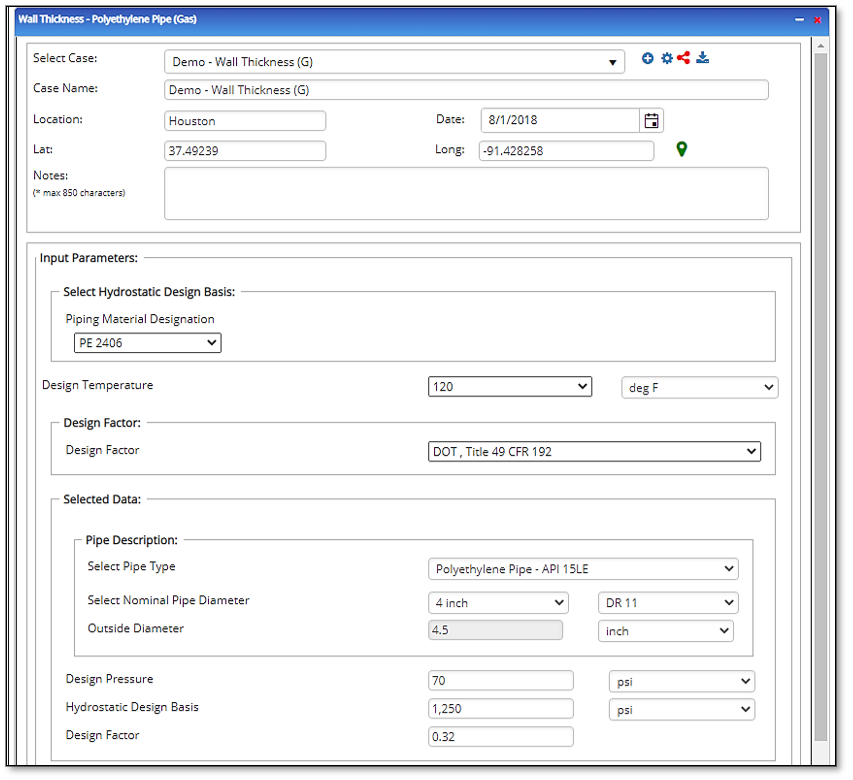
Input Parameters
1. To create a new case, click the “Add Case” button
2. Select the Wall Thickness – Polyethylene Pipe application from the Polyethylene Pipe – Design & Stress Analysis module list.
3. Enter Case Name, Location, Date and any necessary notes.
4. Fill out all required fields.
5. Make sure the values you are inputting are in the correct units.
6. Click the CALCULATE button.
· Pipe Material Designation
· Design Temperature
· Design Factor
· Nominal Pipe Size
· Nominal Outside Diameter
· Design Pressure
· Hydrostatic Design Basis
Outputs/Reports
1. View the results.
2. If an input parameter needs to be edited be sure to hit the CALCULATE button after the change.
3. To SAVE, fill out all required case details then click the SAVE button.
4. To rename an existing file, click the SAVE As button. Provide all case info then click SAVE.
5. To generate a REPORT, click the REPORT button.
6. The user may export the Case/Report by clicking the Export to Excel/PowerPoint icon.
7. To delete a case, click the DELETE icon near the top of the widget.
· Internal Design Pressure

Related Links
Table of Contents
Table of Pages
Table of Contents
- Pipeline HUB User Resources
- AC Mitigation PowerTool
- API Inspector's Toolbox
- Horizontal Directional Drilling PowerTool
- Crossings Workflow
- Hydrotest PowerTool
- Pipeline Toolbox
- Encroachment Manager
- PRCI AC Mitigation Toolbox
- PRCI RSTRENG
- RSTRENG+
- Ad-hoc Analysis
- Database Import
- Data Availability Dashboard
- ESRI Map
- Report Builder
- Crossings Workflow
- Hydrotest PowerTool
- Investigative Dig PowerTool
- Hydraulics PowerTool
- External Corrosion Direct Assessment Procedure - RSTRENG
- Canvas
- Definitions
- Pipe Schedule and Specifications Tables