
Centrifugal Compressor – Required Adiabatic Horsepower
This application uses a compression unit that calculates a natural gas-fired turbine to turn a centrifugal compressor. The centrifugal compressor is like a large fan inside a case, which pumps the gas as the fan turns.
Size of the fan and speed within the case controls the pumping action.
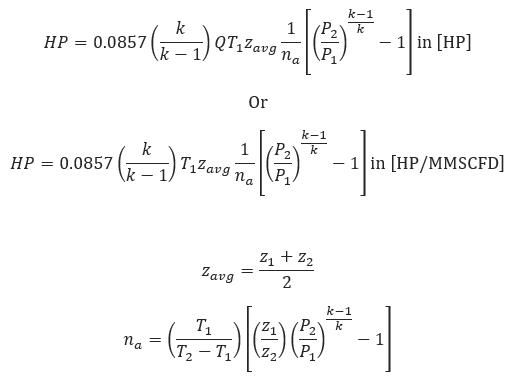
𝐻𝑃 − Adiabatic Compressor Horsepower
𝑄 − Gas Flow Rate[MMSCFD]
𝑇1 − Suction Temperature[°𝑅]
𝑇2 − Discharge Temperature[°𝑅]
Z1 − Compressibility of Gas at Suction Conditions
Z2 − Compressibility of Gas at Discharge Conditions
𝑧𝑎𝑣𝑔 − Average Compressibility Factor
𝑘 =  − Specific Heat Ratio
𝑛𝑎 − Compressor Adiabatic (Isentropic)Efficiency
𝑃1 − Gas Suction Pressure[psia]
𝑃2 − Gas Discharge Pressure[psia]
CNGA/GPSA Compressibility Factor Approximation
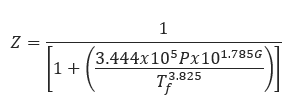
𝑍 − Compressibility Factor
𝑃 − Pressure(psi)
𝑇𝑓 − Gas Flowing Temperature[°𝑅]
This approximation will produce results sufficiently accurate for preliminary calculations.
Brake Horsepower
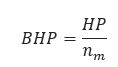
𝑛𝑚 − Mechanical Efficency 𝑛𝑚 = 0.95/0.98
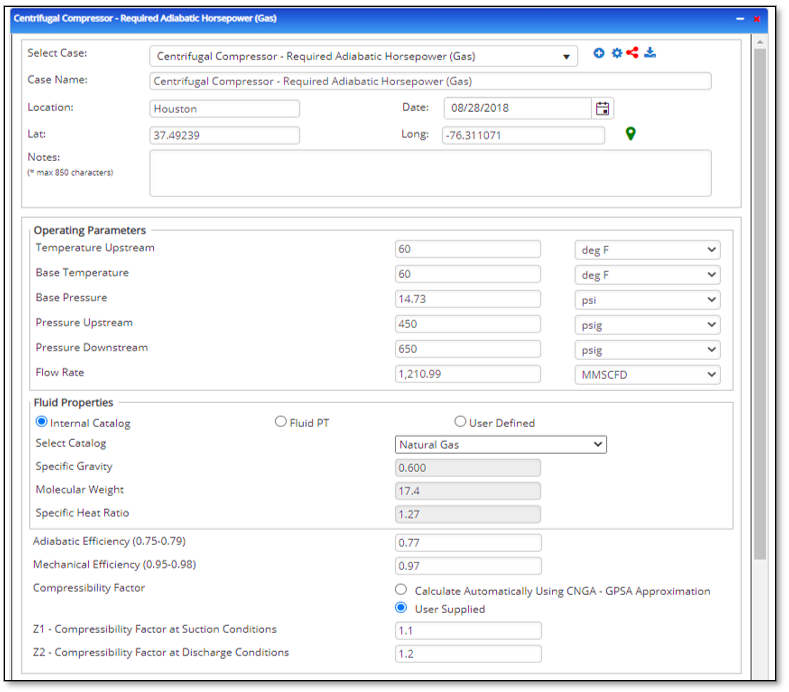
Input Parameters
- To create a new case, click the “Add Case” button
- Select the Centrifugal Compressor – Required Adiabatic Horsepower application from the Pipeline Compressor module.
- Enter Case Name, Location, Date and any necessary notes.
- Fill out all required fields.
- Make sure the values you are inputting are in the correct units.
- Click the CALCULATE button.
- Base Pressure(psi)
- Base Temperature(°F)
- Suction Pressure(psi)
- Suction Temperature(°F)
- Discharge Pressure(psi)
- Capacity/Required Flow Rate(ft/sec.)
- Gas Specific Heat Ratio
- Gas Specific Gravity (Relative to air)
- Adiabatic Efficiency (0.75 – 0.79)
- Mechanical Efficiency (0.95 – 0.98)
- Z1 – Compressibility Factor at Suction Conditions
- Z2 – Compressibility Factor at Discharge Conditions
Outputs/Reports
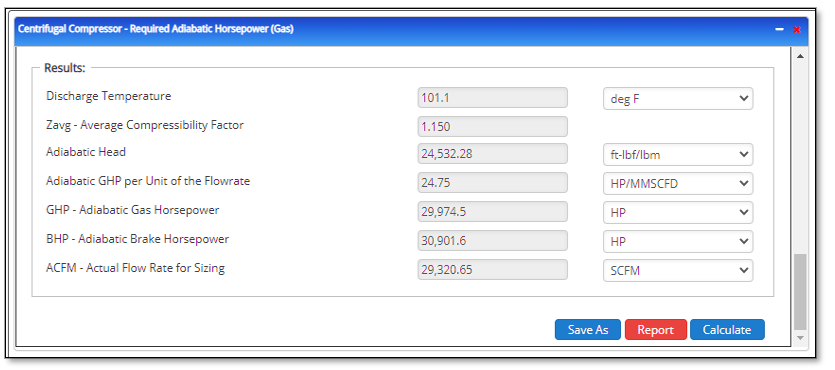
- View the results.
- If an input parameter needs to be edited be sure to hit the CALCULATE button after the change.
- To SAVE, fill out all required case details then click the SAVE button.
- To rename an existing file, click the SAVE As button. Provide all case info then click SAVE.
- To generate a REPORT, click the REPORT button.
- The user may export the Case/Report by clicking the Export to Excel/PowerPoint icon.
- To delete a case, click the DELETE icon near the top of the widget.
- Discharge Temperature(°F)
- Zavg – Average Compressibility Factor
- Adiabatic Head (ft lbf/lbm)
- Adiabatic GHP per Unit of the Flowrate(HP/MMSCFD)
- GHP – Adiabatic Gas Horsepower(HP)
- BHP – Adiabatic Brake Horsepower(HP)
- ACFM – Actual Flow Rate for Sizing(ft³/min)
Related Links
Table of Contents
Table of Pages
Table of Contents
- Pipeline HUB User Resources
- AC Mitigation PowerTool
- API Inspector's Toolbox
- Horizontal Directional Drilling PowerTool
- Crossings Workflow
- Hydrotest PowerTool
- Pipeline Toolbox
- Encroachment Manager
- PRCI AC Mitigation Toolbox
- PRCI RSTRENG
- RSTRENG+
- Ad-hoc Analysis
- Database Import
- Data Availability Dashboard
- ESRI Map
- Report Builder
- Crossings Workflow
- Hydrotest PowerTool
- Investigative Dig PowerTool
- Hydraulics PowerTool
- External Corrosion Direct Assessment Procedure - RSTRENG
- Canvas
- Definitions
- Pipe Schedule and Specifications Tables