
ASTM D 341 Viscosity – Temperature Relations For Hydrocarbons
General Form:
Loglog𝑍 = 𝐴 – 𝐵 log𝑇 (Eq. 1)
Where:
𝑍 = (𝑣 + 0.7 + 𝐶 – 𝐷 – 𝐹 + 𝐺 – 𝐻)
Terms C through H are exponentials on the natural base e.
𝑍 = 𝑣 + 0.7 + 𝑒𝑥𝑝(−1.47 − 1.84𝑣 − 0.51𝑣2)
(Eq. 2)
𝑣 = [𝑍 − 0.7] − exp(−0.7487 − 3.295[𝑍 − 0.7] + 0.6119[𝑍−0.7]2 − 0.3193[𝑍−0.7]3 (Eq. 3)
Inserting Eq. 2 into Eq. 1 above, will permit solving for the constants A and B for a fluid in which some of the experimental kinematic viscosity data fall below 2.0 mm2/s (cSt). This form can also be used to calculate the temperature associated with a desired kinematic viscosity.
Conversely, the kinematic viscosity associated with a stated temperature can be found from the equation determined as in Eq. 2 by solving for Z in the substituted Eq 1, and then subsequently deriving the kinematic viscosity from the value of Z using Eq. 3.
Crude Oil Form:
Loglog(𝑣 + 0.7) = 𝐴 − 𝐵log𝑇
Where:
𝐴 = log(log(𝑣1 + 0.7)) + 𝐵log𝑇1
𝐵 = log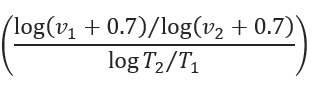
𝑣1 − Kinematic Viscosity cSt (mm2/s) at 𝑇1
𝑇1 − Absolute Temperature (K) = (℉ + 273)
𝑣2 − Kinematic Viscosity cSt (mm2/s) at 𝑇2
𝑇2 − Absolute Temperature (K) = (℉ + 273)
𝑣 = 10(10𝐴−𝐵log𝑇) − 0.7
Input Parameters
- To create a new case, click the “Add Case” button
- Select the ASTM D 341 Viscosity – Temperature Relations for Hydrocarbons application from the Miscellaneous module list.
- Enter Case Name, Location, Date and any necessary notes.
- Fill out all required fields.
- Make sure the values you are inputting are in the correct units.
- Click the CALCULATE button.
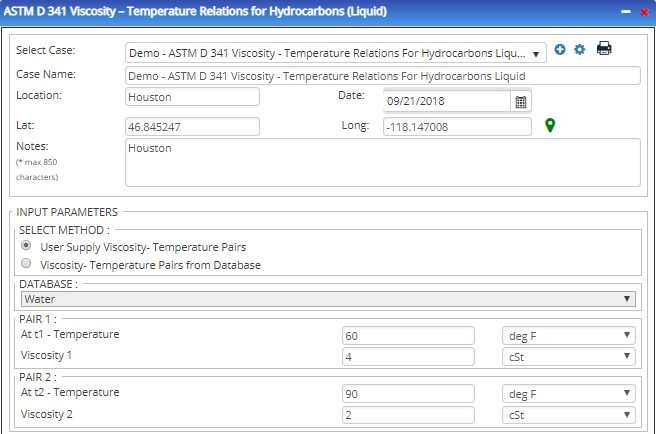
- Select Method
- Product Type
- Temperature (℉ ) (Pair 1)
- Viscosity (cSt) (Pair 1)
- Temperature (℉ ) (Pair 2)
- Viscosity (cSt) (Pair 2)
Outputs/Reports
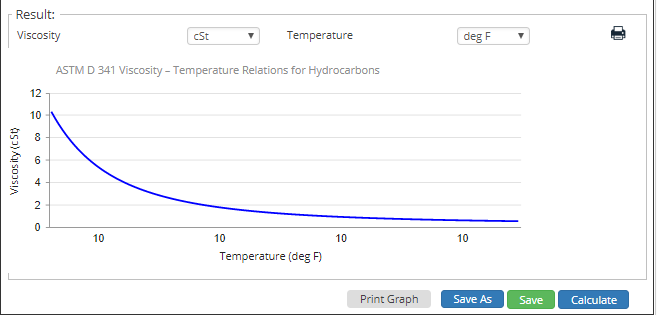
- View the results.
- If an input parameter needs to be edited be sure to hit the CALCULATE button after the change.
- To SAVE, fill out all required case details then click the SAVE button.
- To rename an existing file, click the SAVE As button. Provide all case info then click SAVE.
- To generate a REPORT, click the REPORT button.
- The user may export the Case/Report by clicking the Export to Excel/PowerPoint icon.
- To delete a case, click the DELETE icon near the top of the widget.
Related Links
Table of Contents
Table of Pages
Table of Contents
- Pipeline HUB User Resources
- AC Mitigation PowerTool
- API Inspector's Toolbox
- Horizontal Directional Drilling PowerTool
- Crossings Workflow
- Hydrotest PowerTool
- Pipeline Toolbox
- Encroachment Manager
- PRCI AC Mitigation Toolbox
- PRCI RSTRENG
- RSTRENG+
- Ad-hoc Analysis
- Database Import
- Data Availability Dashboard
- ESRI Map
- Report Builder
- Crossings Workflow
- Hydrotest PowerTool
- Investigative Dig PowerTool
- Hydraulics PowerTool
- External Corrosion Direct Assessment Procedure - RSTRENG
- Canvas
- Definitions
- Pipe Schedule and Specifications Tables