
This application calculates the temperature or pressure at which hydrates form in a natural gas system. Hydrates are ice-like solids that can plug pipelines and measurement or regulation equipment — restricting or stopping gas flow — even at temperatures well above 32°F (0°C) due to elevated system pressures. The calculator supports two industry-recognized methods: the S. Ameripour & M. Barrufet (2009) method, which accounts for gas composition and inhibitors, and the M. Motiee (1991) method, which uses a correlation based on specific gravity.
Note: electrolytes and inhibitors are not included in the Motiee method; those fields are disabled when that method is selected.
Background
Hydrates form when water and hydrocarbon gas molecules combine at or below the dew point temperature of the mixture. Because gas pipeline pressures are typically elevated, the hydrate formation temperature is often above 32°F (0°C), meaning hydrates can form even when the gas itself is not frozen. The risk of hydrate formation increases as pressure rises or temperature falls.
Gas composition plays a significant role in hydrate formations. Heavier hydrocarbons — such as propane and isobutane — raise the formation temperature compared to leaner gas mixtures. Hydrogen sulfide also has a notable impact on formation conditions.
One common mitigation strategy to combat hydrates is to add an electrolyte or alcohol inhibitor (such as methanol or sodium chloride) to the gas stream. Inhibitors lower the hydrate formation temperature at a given pressure, or equivalently raising the hydrate formation pressure for a given temperature.
Equations
S. Ameripour & M. Barrufet, 2009
This method uses correlations published in the Journal of Canadian Petroleum Technology (May 2009, Vol. 48, No. 5) for systems with or without inhibitors. It accepts a known pressure or temperature along with the mole fraction composition of the gas and its specific gravity, and optionally accounts for the weight percent of electrolytes and/or inhibitors in the stream.
GASCalc implements the hydrate formation pressure calculation directly from the journal. When temperature is the unknown, the program uses a numerical root-finding algorithm to determine the dew point temperature. The full detail of this approach are available in Reference 2.
M. Motiee, 1991
As implemented in GASCalc, the Motiee method uses the following empirical equations to calculate hydrate formation temperature or pressure from the gas specific gravity. This method does not include the effects of inhibitors or electrolytes.
Hydrate formation temperature:
T = -238.24469 + 78.996674 \times \log P_a - 5.352544 \times (\log P_a)^2 + 349.473877 \times SG - 150.854675 \times SG^2 - 27.604065 \times SG \times \log P_a
T = -238.24469 + 78.996674 \times \log P_a – 5.352544 \times (\log P_a)^2 + 349.473877 \times SG – 150.854675 \times SG^2 – 27.604065 \times SG \times \log P_a
Where:
T − Hydrate formation temperature (°F)
Pa − Absolute pressure (psia)
SG − Specific gravity of the gas (dimensionless)
Hydrate formation pressure:
P = 5.23479 - 0.004243 \times T + 0.000218 \times T^2 - 7.766945 \times SG + 3.50079 \times SG^2 + 0.019557 \times T \times SG - P_{ATM}P = 5.23479 – 0.004243 \times T + 0.000218 \times T^2 – 7.766945 \times SG + 3.50079 \times SG^2 + 0.019557 \times T \times SG – P_{ATM}
Where:
P − Gauge pressure (psig)
Pa − Absolute pressure (psia)
PATM − Atmospheric pressure (psia)
SG − Specific gravity of the gas (dimensionless)
T − Temperature (°F)
Case Guide
Part 1: Create Case
- Select the Hydrates application from the Gas Properties Module.
- To create a new case, click the “Add Case” button.
- Enter the Case Name, Location, Date, and any necessary notes.
- Click the Base Conditions button. Set the base pressure, base temperature, gas properties file (or enter specific gravity manually), and atmospheric pressure method. Click Apply.
- From the Calculation Method list, select either S. Ameripour & M. Barrufet, 2009 or M. Motiee, 1991.
- Click the red label for the unknown item (Temperature or Pressure) until it is underlined.
- Select the desired dimensional units for all data items.
- Enter values for all known parameters. If using the Ameripour method, enter inhibitor and electrolyte weight percentages as applicable.
- Click the CALCULATE button to compute the unknown value.
Input Parameters
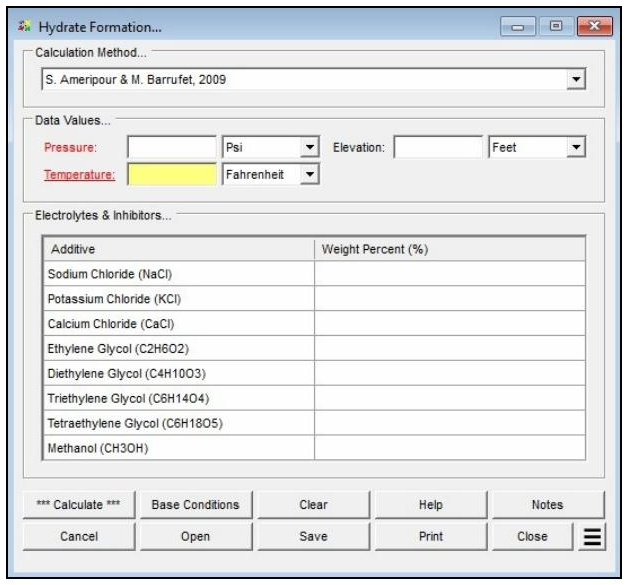
| Parameter | Description |
|---|---|
| Calculation Method | Specifies which method is used to perform the calculation: S. Ameripour & M. Barrufet, 2009 (composition-based, supports inhibitors) or M. Motiee, 1991 (specific gravity correlation, inhibitors disabled). |
| Pressure | Gauge pressure at the potential hydrate location (Psi or Bar). Can be set as the unknown by clicking the red label until it is underlined. |
| Temperature | Gas temperature at the potential hydrate location (Fahrenheit or Celsius). Can be set as the unknown. |
| Elevation | Height above mean sea level at the location. Only displayed when the Atmospheric Pressure Method is not set to “None” or “None — Entered Value.” |
| Atm Pressure | Atmospheric pressure at the location. Only displayed when the Atmospheric Pressure Method is set to “None — Entered Value.” |
| Electrolytes & Inhibitors | Weight percent of each electrolyte or inhibitor present in the gas stream (NaCl, KCl, CaCl, ethylene glycol, diethylene glycol, triethylene glycol, tetraethylene glycol, methanol). Disabled when the Motiee method is selected. |
Part 2: Outputs/Reports
- u003cliu003eIf you need to modify an input parameter, click the CALCULATE button after the change.u003c/liu003eu003cliu003eTo SAVE, fill out all required case details then click the SAVE button.u003c/liu003eu003cliu003eTo rename an existing file, click the SAVE As button. Provide all case info then click SAVE.u003c/liu003eu003cliu003eTo generate a REPORT, click the REPORT button.u003c/liu003eu003cliu003eThe user may export the Case/Report by clicking the Export to Excel icon.u003c/liu003eu003cliu003eTo delete a case, click the DELETE icon near the top of the widget.u003c/liu003e
Results
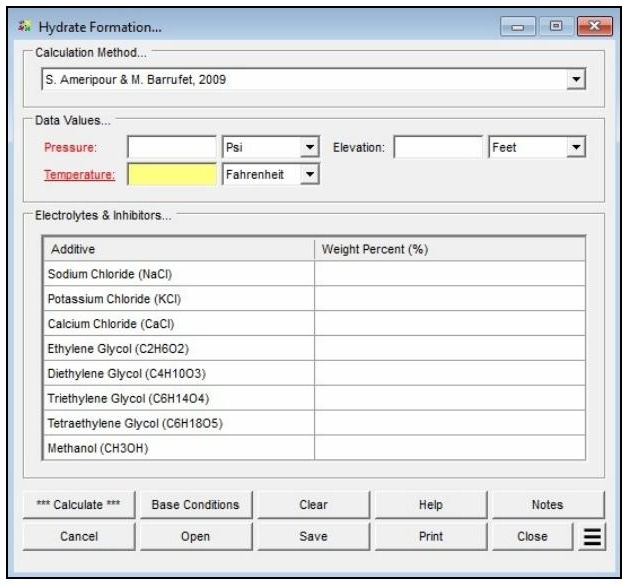
| Output | Description |
|---|---|
| Pressure | Gauge pressure at the potential hydrate location (Psi or Bar). Can be set as the unknown by clicking the red label until it is underlined. |
| Temperature | Gas temperature at the potential hydrate location (Fahrenheit or Celsius). Can be set as the unknown. |
| Hydrate Formation Temperature | Displays the temperature at which hydrates will form at the specified pressure and gas composition (°F or °C). Shown in red if outside the valid range of the selected method. |
| Hydrate Formation Pressure | Displays the pressure at which hydrates will form at the specified temperature and gas composition (psig or Bar). Shown in red if outside the valid range of the selected method. |
References
- M. Motiee — “Estimate Possibility Of Hydrates,” Hydrocarbon Processing, July 1991.
- S. Ameripour & M. Barrufet — “Improved Correlations Predict Hydrate Formation Pressures Or Temperatures For Systems With Or Without Inhibitors,” Journal of Canadian Petroleum Technology, May 2009, Volume 48, No. 5.
FAQ
-
What equations of state are available in this module?
Two equations of state are supported: AGA Report No. 8 – 2017 Detail, and AGA Report No. 8 – 2017 GERG-2008 (“Thermodynamic Properties of Natural Gas and Related Gases,” Parts 1 & 2).
The Joule-Thomson coefficient uses the method of Maric and Ivek with equation-of-state values from AGA Report No. 8, 1992.
AGA Report No. 10 – 2003 (“Speed of Sound In Natural Gas and Other Related Hydrocarbon Gases”) uses AGA 8 to calculate the speed of sound and other thermodynamic properties.
-
What information do I need before running a calculator?You need to select a calculation method, define the gas composition (either by selecting a gas properties file or by entering a mole percent for each component so the total equals 100%), and choose the property to calculate. You also set the average gas pressure and temperature, and define base conditions (base pressure, base temperature, and an atmospheric pressure method) on the Base Conditions screen.
-
How do I enter a gas composition?You can either select a prepared Gas Properties File or set the Gas Properties File to “None” and type the mole percentages directly into the Component Table. The sum of all component percentages must equal 100%. If a component is not present, leave its field empty or set it to zero. The Force Composition To Total 100% button can adjust the entered values so they sum to 100%.
-
Can I see the intermediate values behind a result?Yes. After clicking Calculate, use the See Calculation Details Additional Action to display intermediate results that can be used to verify and compare against other procedures or published examples. These include values such as Molar Density, Molecular Weight, Density at Conditions, and the Compressibility Factor.