
This application calculates the relationship between pressure, physical volume, and temperature (P,V,T) for a gas under two different sets of conditions. Because gas is compressible, its physical volume changes with changes in pressure, temperature, or elevation. The calculator also computes the equivalent volume of gas at base (standard) conditions contained in a specified physical volume.
Note: “Volume” in this calculator refers to the physical space occupied by the gas — not the standard quantity of gas. To calculate gas quantity at varying conditions, use one of the Meter calculation routines.
Background
Gas is a compressible fluid, meaning its physical volume responds to changes in pressure, temperature, and elevation. Increasing pressure compresses the gas into a smaller physical volume; increasing temperature causes the gas to expand. A rise in elevation reduces atmospheric pressure, which in turn reduces the absolute pressure acting on the gas and allows it to expand.
When a volume is fixed — such as gas contained in a pipeline segment or a tank — a change in pressure produces a corresponding change in temperature, and vice versa. This behaviour is governed by the combined gas law, a modification of Charles’ and Boyle’s Laws.
A common practical application of this calculation is pressure testing. When a pipe segment is filled with air from a compressor, the air typically enters at 100–200°F. As the air cools during the test period, pressure drops — a normal effect that does not necessarily indicate a leak. The P,V,T calculator can estimate the expected pressure reduction from a given temperature drop, allowing the engineer to compare it against the actual measured drop and assess test success or failure.
Equations
GASCalc uses a modified form of the combined Charles’ and Boyle’s Laws to relate the two sets of conditions:
\frac{P_1 V_1}{T_1} = \frac{P_2 V_2}{T_2}\frac{P_1 V_1}{T_1} = \frac{P_2 V_2}{T_2}
Where:
P1 − Absolute pressure at first conditions (psia) = P1,GAUGE + P1,ATM
P2 − Absolute pressure at second conditions (psia) = P2,GAUGE + P2,ATM
P1,ATM − Atmospheric pressure at first conditions (psia)
P1,GAUGE − Gauge pressure at first conditions (psig)
P2,ATM − Atmospheric pressure at second conditions (psia)
P2,GAUGE − Gauge pressure at second conditions (psig)
T1 − Temperature at first conditions (°R)
T2 − Temperature at second conditions (°R)
V1 − Physical volume at first conditions (ft3)
V2 − Physical volume at second conditions (ft3)
Case Guide
Part 1: Create Case
- Select the PVT application from the Gas Properties Module.
- To create a new case, click the “Add Case” button.
- Enter the Case Name, Location, Date, and any necessary notes.
- Click the Base Conditions button. Set the base pressure, base temperature, gas properties file (or specific gravity manually), atmospheric pressure method, and compressibility factor method. Click Apply.
- Click the red label for the unknown item (Pressure 1, Pressure 2, Temperature 1, Temperature 2, Volume 1, or Volume 2) until it is underlined.
- Select the desired dimensional units for all data items.
- Enter values for all known parameters under First Conditions and Second Conditions.
- Click the CALCULATE button to compute the unknown value and the Volume at Base Conditions.
Input Parameters
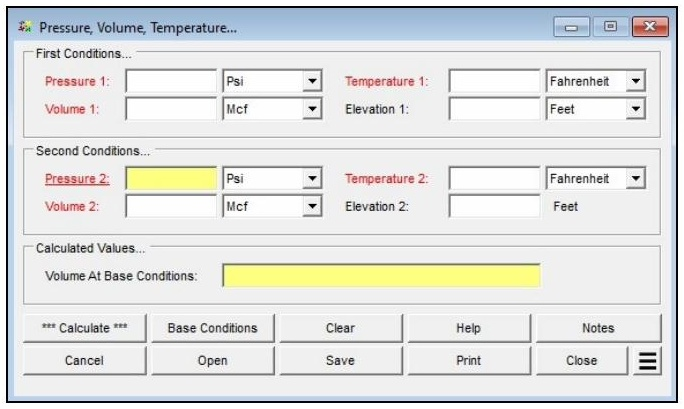
| Parameter | Description |
|---|---|
| Pressure 1 | Gauge pressure at the first set of conditions (Psi or Bar). Can be set as the unknown by clicking the red label until underlined. |
| Volume 1 | Physical volume of gas at the first set of conditions (Mcf, cf, or Mm³). Can be set as the unknown. |
| Temperature 1 | Temperature of the gas at the first set of conditions (Fahrenheit or Celsius). Can be set as the unknown. |
| Elevation 1 | Height above mean sea level at the first set of conditions. Displayed when Atmospheric Pressure Method is not set to “None” or “None — Entered Value.” |
| Atm Pressure 1 | Atmospheric pressure at the first set of conditions (psia). Displayed only when Atmospheric Pressure Method is set to “None — Entered Value.” |
| Pressure 2 | Gauge pressure at the second set of conditions (Psi or Bar). Can be set as the unknown. |
| Volume 2 | Physical volume of gas at the second set of conditions (Mcf, cf, or Mm³). Can be set as the unknown. |
| Temperature 2 | Temperature of the gas at the second set of conditions (Fahrenheit or Celsius). Can be set as the unknown. |
| Elevation 2 | Height above mean sea level at the second set of conditions. Displayed when Atmospheric Pressure Method is not set to “None” or “None — Entered Value.” |
| Atm Pressure 2 | Atmospheric pressure at the second set of conditions (psia). Displayed only when Atmospheric Pressure Method is set to “None — Entered Value.” |
Part 2: Outputs/Reports
- u003cliu003eIf you need to modify an input parameter, click the CALCULATE button after the change.u003c/liu003eu003cliu003eTo SAVE, fill out all required case details then click the SAVE button.u003c/liu003eu003cliu003eTo rename an existing file, click the SAVE As button. Provide all case info then click SAVE.u003c/liu003eu003cliu003eTo generate a REPORT, click the REPORT button.u003c/liu003eu003cliu003eThe user may export the Case/Report by clicking the Export to Excel icon.u003c/liu003eu003cliu003eTo delete a case, click the DELETE icon near the top of the widget.u003c/liu003e
Results
| Output | Description |
|---|---|
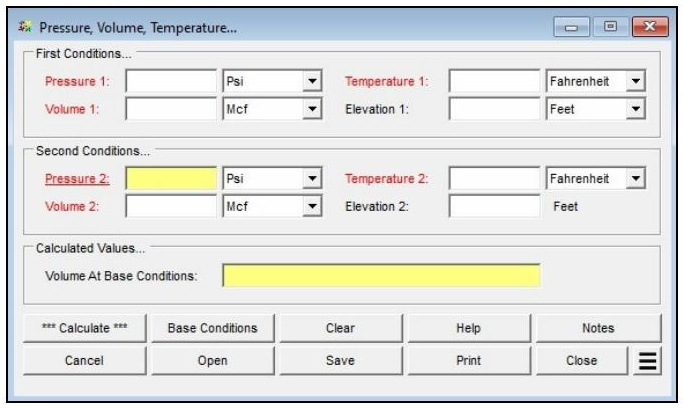
| Solved Unknown (P, V, or T) | Displays the calculated value of whichever parameter was set as the unknown — Pressure 1, Pressure 2, Volume 1, Volume 2, Temperature 1, or Temperature 2 — in the units specified for that item. |
| Volume at Base Conditions | Displays the equivalent volume of gas contained in Volume 1, expressed at the specified base pressure and base temperature (Mcf or Mm³). |
References
- Industrial Press — Gas Engineers Handbook, 1965.
- American Gas Association — Measurement, GEOP Series Book M-1, 1993.
FAQ
-
What equations of state are available in this module?
Two equations of state are supported: AGA Report No. 8 – 2017 Detail, and AGA Report No. 8 – 2017 GERG-2008 (“Thermodynamic Properties of Natural Gas and Related Gases,” Parts 1 & 2).
The Joule-Thomson coefficient uses the method of Maric and Ivek with equation-of-state values from AGA Report No. 8, 1992.
AGA Report No. 10 – 2003 (“Speed of Sound In Natural Gas and Other Related Hydrocarbon Gases”) uses AGA 8 to calculate the speed of sound and other thermodynamic properties.
-
What information do I need before running a calculator?You need to select a calculation method, define the gas composition (either by selecting a gas properties file or by entering a mole percent for each component so the total equals 100%), and choose the property to calculate. You also set the average gas pressure and temperature, and define base conditions (base pressure, base temperature, and an atmospheric pressure method) on the Base Conditions screen.
-
How do I enter a gas composition?You can either select a prepared Gas Properties File or set the Gas Properties File to “None” and type the mole percentages directly into the Component Table. The sum of all component percentages must equal 100%. If a component is not present, leave its field empty or set it to zero. The Force Composition To Total 100% button can adjust the entered values so they sum to 100%.
-
Can I see the intermediate values behind a result?Yes. After clicking Calculate, use the See Calculation Details Additional Action to display intermediate results that can be used to verify and compare against other procedures or published examples. These include values such as Molar Density, Molecular Weight, Density at Conditions, and the Compressibility Factor.