
Introduction
This application calculates the various thermodynamic properties associated with a gas composition, including enthalpy, entropy, the isobaric (constant-pressure) and isochoric (constant-volume) heat capacities, and the Joule-Thomson coefficient. These properties vary with both gas composition and operating conditions and are commonly required as inputs to heat loss and gain calculations, such as gas heater sizing.
All calculation methods require a gas properties file describing the gas composition, or the manual entry of a mole percent for each component. The component mole percentages must sum to 100%. The “real gas” property values reported by the calculator depend on the Compressibility Factor Method that is automatically associated with the selected Calculation Method.
Background
The behavior of thermodynamic properties for a real gas composition deviates from that of an ideal gas. Natural gas mixtures represent a combination of real and ideal gas behavior. Calculating the thermodynamic properties of these mixtures is commonly based on interpolating extensive data sets of experimentally determined values for the individual components, then applying a mixing rule to combine the individual values into a total value representative of the mixture. Several data sources and mixing rules are available.
The values calculated by GASCalc are determined using a user-selected method that combines the data set, in equation form, with appropriate mixing rules to compute the “ideal gas” properties. The method then computes the “real gas” values according to its own definitions. To accurately compute the real gas property values, a suitable Compressibility Factor Method must be used in conjunction with the properties calculation method.
Isentropic Exponent (k value)
The ratio of the constant-pressure specific heat capacity (Cp) to the constant-volume specific heat capacity (Cv) is often referred to as the isentropic exponent, or “k” value, and GASCalc uses this definition in some of its calculations. The true isentropic exponent is related to this ratio and is often approximated by it; however, the two are not equal. The Cp to Cv ratio is reported in the thermodynamic property results for some calculated values, but the true isentropic exponent is only reported in the Sonic Velocity calculation when using the AGA 10 – 2003 or either of the AGA 8 calculation methods.
Joule-Thomson Cooling
In most cases, in the absence of an outside heat source, when the pressure of a real gas is reduced the temperature of the gas is also reduced. This is known as Joule-Thomson cooling and is the principle behind many refrigeration cycles. The effect is especially prevalent when gas pressure is suddenly reduced, such as when gas flows through a regulator, relief valve, or a partially open (throttled) valve, so the outlet temperature of a regulator is nearly always lower than the inlet temperature.
This phenomenon also occurs in pipe flow; however, the pressure drop there usually occurs in small, gradual increments, and the heat gain from the environment surrounding the pipe is generally greater than the cooling effect of the pressure drop. As a result, the downstream temperature of a pipe segment is often nearly equal to the upstream temperature, regardless of the pressure drop across the segment. The Joule-Thomson coefficient can be used to estimate the downstream gas temperature when the inlet temperature and pressure drop are known; it is expressed in terms of temperature difference per pressure difference.
Equations
The calculator includes three methods for the thermodynamic properties. The full details of each method are extensive, and we encourage users to refer to the cited references for the complete calculation procedures and parameter definitions.
American Gas Association Report No. 10 – 2003
Except for the Joule-Thomson coefficient, the thermodynamic property calculations are performed using the procedures outlined in AGA Report No. 10, “Speed of Sound In Natural Gas and Other Related Hydrocarbon Gases,” 2003 (Reference 1). This is the only method that reports the “Real Gas” specific heat, enthalpy, and entropy items, and it is required for the Joule-Thomson coefficient equation below.
Joule-Thomson Coefficient
Note: The equation below only applies when using the American Gas Association Report No. 10 – 2003 calculation method.
As implemented in the calculator, the Joule-Thomson coefficient is calculated using the method described by Maric and Ivek (Reference 2), using various equation-of-state values defined by AGA Report No. 8, 1992 (Reference 3), and using the following equation:
\mu_{JT} = \frac{R T^2}{P\, C_P} \left(\frac{\partial Z}{\partial T}\right)_P\mu_{JT} = \frac{R T^2}{P\, C_P} \left(\frac{\partial Z}{\partial T}\right)_P
Where:
CP − Constant Pressure Specific Heat
P − Gas Pressure (psia)
R − Universal Gas Constant
T − Gas Temperature (°R)
ΔP − Pressure Drop (Difference) (psi)
ΔT − Temperature Drop (Difference) (°R)
(∂Z / ∂T)P − Partial derivative of compressibility with respect to temperature at constant pressure
American Gas Association Report No. 8 – 2017 (Detail)
The thermodynamic property calculations are performed using the procedures outlined in AGA Report No. 8, “Thermodynamic Properties of Natural Gas and Related Gases,” Parts 1 & 2, 2017 (References 4 and 5), using the DETAIL equation of state.
American Gas Association Report No. 8 – 2017 (GERG-2008)
The thermodynamic property calculations are performed using the procedures outlined in AGA Report No. 8, “Thermodynamic Properties of Natural Gas and Related Gases,” Parts 1 & 2, 2017 (References 4 and 5), using the GERG-2008 equation of state.
Case Guide
Part 1: Create Case
- Select the Thermodynamic Properties application from the Gas Properties Module.
- Click the Clear command button to set all values to an empty (null) value.
- Click the Base Conditions command button, enter an appropriate base pressure and temperature, select an Atmospheric Pressure Method, then click Apply.
- From the Calculation Method list, select an appropriate method.
- Either select an appropriate Gas Properties File or enter a mole percent for each component in the component table (the total must equal 100%).
- From the Calculated Value list, select the item to calculate.
- Select the desired dimensional units for all data items and enter a value for all known data items.
- Click the CALCULATE command button to overview results.
Input Parameters
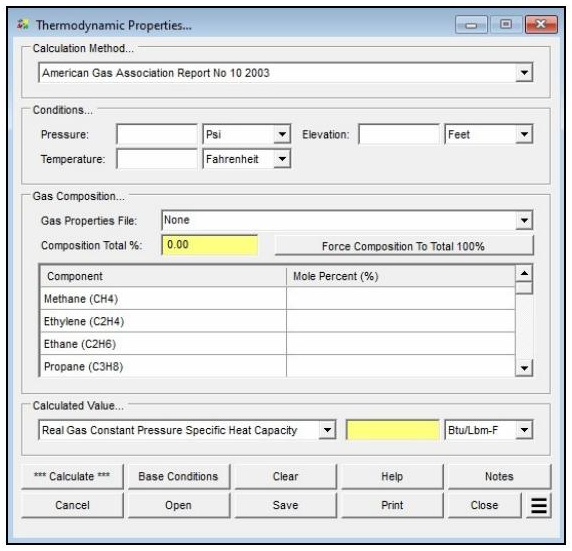
| Parameter | Description |
|---|---|
| Calculation Method | Specifies which method is used to perform the calculation (AGA Report No. 10 – 2003, AGA Report No. 8 – 2017 Detail, or AGA Report No. 8 – 2017 GERG-2008). |
| Pressure | Specifies the average pressure of the gas. |
| Temperature | Specifies the average temperature of the gas. |
| Elevation | Specifies the height above mean sea level associated with the average pressure value. Only displayed when the Atmospheric Pressure Method in the Base Conditions is not set to “None” or “None – Entered Value”. |
| Atm Press | Specifies the atmospheric pressure value associated with the average pressure value. Only displayed when the Atmospheric Pressure Method in the Base Conditions is set to “None – Entered Value”. |
| Gas Properties File | Specifies which gas properties file is used for the gas composition. If set to “None,” it allows entry of the individual gas property values in the Component Table. |
| Component Table | Specifies the gas composition values, expressed as mole percentages. The sum of all percentages must equal 100%. If a component does not exist in the composition, leave the field empty or set its value to zero. |
| Calculated Value | Selects the thermodynamic property to be calculated and reported, along with its dimensional units. |
| Base Pressure / Base Temperature | Set on the Base Conditions screen. Establishes the base (reference) pressure and temperature used for the calculation. |
| Atmospheric Pressure Method | Set on the Base Conditions screen. Determines how atmospheric pressure is established and controls whether the Elevation or Atm Press fields are displayed. |
Part 2: Outputs/Reports
- If you need to modify an input parameter, click the CALCULATE button after the change.
- To view intermediate results such as Molar Density, Molecular Weight, Density at Conditions, and Compressibility Factor, click the See Calculation Details Additional Action (Calculate must be clicked first).
- To SAVE the calculation, click the Save command button (calculation files use the .thm extension).
- To print the data values and results, click the Print command button and configure the Print Settings screen.
- To calculate a table of results over a range of values, use the Calculate Table Of Results Additional Action.
- To compare results by changing a value without re-entering all data, use the Open Duplicate Calculation Additional Action.
Results
| Output | Description |
|---|---|
| Composition Total % | Displays a running total of the summation of the entered component values. Must equal 100% for a valid calculation. |
| Enthalpy | Displays the enthalpy value. |
| Entropy | Displays the entropy value. |
| Isobaric Heat Capacity | Displays the isobaric (constant pressure) heat capacity value. |
| Isochoric Heat Capacity | Displays the isochoric (constant volume) heat capacity value. |
| Joule-Thomson Coefficient | Displays the Joule-Thomson coefficient value. Calculated using the AGA Report No. 10 – 2003 method. |
| Real Gas Constant Pressure Specific Heat Capacity | Displays the constant pressure specific heat value adjusted for “real gas” conditions. Only displayed when the AGA Report No. 10 – 2003 method is selected. |
| Real Gas Constant Volume Specific Heat Capacity | Displays the constant volume specific heat value adjusted for “real gas” conditions. Only displayed when the AGA Report No. 10 – 2003 method is selected. |
| Real Gas Enthalpy | Displays the enthalpy value adjusted for “real gas” conditions. Only displayed when the AGA Report No. 10 – 2003 method is selected. |
| Real Gas Entropy | Displays the entropy value adjusted for “real gas” conditions. Only displayed when the AGA Report No. 10 – 2003 method is selected. |
| Real Gas Specific Enthalpy | Displays the specific enthalpy value adjusted for “real gas” conditions. |
| Real Gas Specific Entropy | Displays the specific entropy value adjusted for “real gas” conditions. |
| Calculation Details (intermediate) | Available via the See Calculation Details Additional Action. Includes intermediate values such as Molar Density, Molecular Weight, Density at Conditions, and Compressibility Factor. |
Note: The AGA Report No. 10 – 2003 method uses an iterative solution algorithm, so its results are not instantaneous unlike most other calculation routines. The number of decimal places shown for any calculated item can be set under File > Preferences > Decimals.
References
- American Gas Association, AGA Report No. 10, Speed of Sound In Natural Gas and Other Related Hydrocarbon Gases, 2003.
- InTech, Natural Gas, Natural Gas Properties and Flow Computation, Ivan Maric and Ivan Ivek, 2010.
- American Gas Association, AGA Report No. 8, Compressibility of Natural Gas and Other Related Hydrocarbon Gases, 1992, 1994 Printing.
- American Gas Association, AGA Report No. 8 Part 1, Thermodynamic Properties of Natural Gas and Related Gases, DETAIL and GROSS Equations of State, 3rd Ed., 2017.
- American Gas Association, AGA Report No. 8 Part 2, Thermodynamic Properties of Natural Gas and Related Gases, GERG-2008 Equation of State, 1st Ed., 2017.
FAQ
-
What equations of state are available in this module?
Two equations of state are supported: AGA Report No. 8 – 2017 Detail, and AGA Report No. 8 – 2017 GERG-2008 (“Thermodynamic Properties of Natural Gas and Related Gases,” Parts 1 & 2).
The Joule-Thomson coefficient uses the method of Maric and Ivek with equation-of-state values from AGA Report No. 8, 1992.
AGA Report No. 10 – 2003 (“Speed of Sound In Natural Gas and Other Related Hydrocarbon Gases”) uses AGA 8 to calculate the speed of sound and other thermodynamic properties.
-
What information do I need before running a calculator?You need to select a calculation method, define the gas composition (either by selecting a gas properties file or by entering a mole percent for each component so the total equals 100%), and choose the property to calculate. You also set the average gas pressure and temperature, and define base conditions (base pressure, base temperature, and an atmospheric pressure method) on the Base Conditions screen.
-
How do I enter a gas composition?You can either select a prepared Gas Properties File or set the Gas Properties File to “None” and type the mole percentages directly into the Component Table. The sum of all component percentages must equal 100%. If a component is not present, leave its field empty or set it to zero. The Force Composition To Total 100% button can adjust the entered values so they sum to 100%.
-
Can I see the intermediate values behind a result?Yes. After clicking Calculate, use the See Calculation Details Additional Action to display intermediate results that can be used to verify and compare against other procedures or published examples. These include values such as Molar Density, Molecular Weight, Density at Conditions, and the Compressibility Factor.