
The Meter MatchMaker tool searches the GASCalc meter property database to find all meters that can satisfy a specified set of operating conditions — including maximum flow rate, meter pressure, differential pressure, and maximum velocity. Rather than sizing a single meter manually, this tool returns a filtered list of qualifying meters from any or all manufacturers, helping engineers quickly identify candidates that fall within acceptable capacity limits.
Note: Matching is based on nominal meter properties. Always consult the appropriate manufacturer’s literature before selecting a meter for a specific application. The effect of upstream or downstream piping is not considered in the matching calculations.
How Meter Matching Works
When List Matching Meters is executed, the routine builds a candidate set from all meters of the specified type in the currently assigned Meter Property Table and then progressively eliminates meters that fail to meet the entered criteria.
Step 1 — Build the Base Selection Set
All meters of the specified type (or all types if “Any/All” is selected) are drawn from the Meter Property Table. Any meter whose Display property is “No” is immediately removed.
Step 2 — Filter by Manufacturer
If a specific manufacturer is selected, only meters from that manufacturer are retained.
Step 3 — Filter by Rated Pressure
Any meter whose maximum rated pressure is below the entered target meter pressure is eliminated. All pressure values are in gauge pressure.
Step 4 — Filter by Differential Pressure
For meter types where differential pressure governs, any meter whose rated range does not encompass the entered target value is removed.
Step 5 — Filter by Capacity Range
The rated capacity is calculated, then multiplied by the Lower and Upper Match Limit percentages to form an acceptable capacity band. Meters outside this band are eliminated.
Match Results
Remaining meters are displayed showing Size/Type Code, minimum and maximum flow rate, maximum rated pressure, and description. Clicking a row opens the full meter property details.
Base Conditions
| Setting | Description |
|---|---|
| Base Pressure | Reference pressure for standard volume flow calculations (e.g., 14.73 Psia) |
| Base Temperature | Reference temperature (e.g., 60 °F) |
| Use Gas Properties File | Select a gas properties file or “None” to enter values manually |
| Atmospheric Pressure Method | Method used to determine atmospheric pressure |
Case Guide
Part 1: Create Case
- Select the Meter MatchMaker application from the Meters Module.
- Click the Clear command button to set all values to blank (null).
- Click the Base Conditions command button. Set the Base Pressure, Base Temperature, and select or enter Gas Properties. Choose the Atmospheric Pressure Method as appropriate. Click Apply to save and return.
- From the Meter Type list, select a specific meter type or Any/All to search across all types.
- From the Manufacturer list, select a specific manufacturer or Any/All.
- Select the desired dimensional units for all data items.
- Enter the Target Operating Data values: Maximum Flow Rate, Meter Pressure, Differential Pressure (where applicable), Maximum Velocity, Elevation, Lower Match Limit, and Upper Match Limit.
- Click the List Matching Meters command button. A message will display the number of matching meters found. Click OK to dismiss the message and view results in the Results list.
- Click on any row in the Results list to open the meter information screen and review the full Property Table data for that meter.
Input Parameters
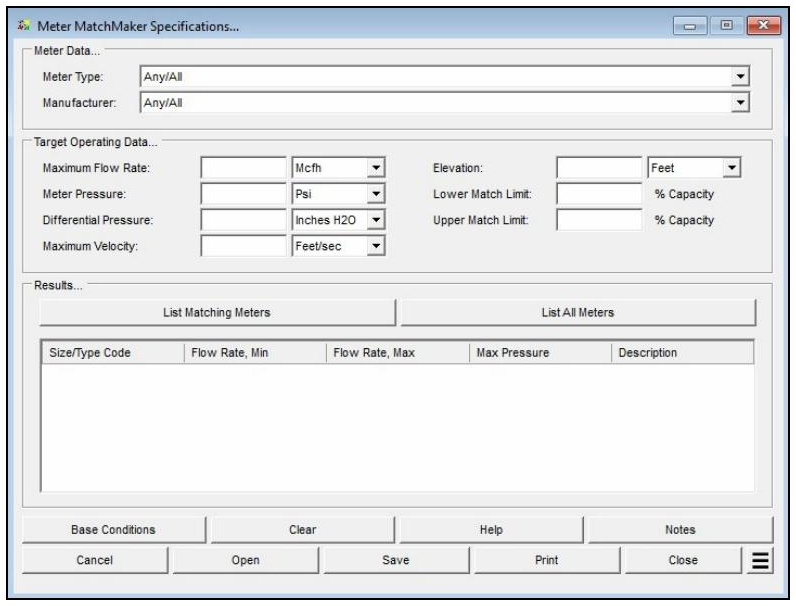
| Parameter | Description |
|---|---|
| Meter Type | Specifies the type of meter to consider during matching, or “Any/All” to include all meter types. |
| Manufacturer | Limits matching to meters from a specific manufacturer, or “Any/All” to consider all manufacturers. |
| Maximum Flow Rate | Specifies the required maximum flow rate through the meter (standard volume units). |
| Meter Pressure | Specifies the gauge pressure at the inlet (upstream) side of the meter. |
| Differential Pressure | Specifies the differential pressure across the meter. Not applicable to all meter types. |
| Maximum Velocity | Specifies the required maximum velocity through the meter. |
| Elevation | Specifies the height above mean sea level at the meter location. Displayed only when the Atmospheric Pressure Method is not set to “None” or “None – Entered Value.” |
| Atm Pressure | Specifies the atmospheric pressure at the meter location. Displayed only when the Atmospheric Pressure Method is set to “None – Entered Value.” |
| Lower Match Limit | Specifies the lower acceptable capacity range of the meter, expressed as a percentage of rated capacity. |
| Upper Match Limit | Specifies the upper acceptable capacity range of the meter, expressed as a percentage of rated capacity. |
Part 2: Outputs/Reports
- u003cliu003eIf you need to refine results, adjust any input parameter and click List Matching Meters again.u003c/liu003eu003cliu003eTo SAVE, fill out all required case details then click the SAVE button.u003c/liu003eu003cliu003eTo rename an existing file, click the SAVE As button. Provide all case info then click SAVE.u003c/liu003eu003cliu003eTo generate a REPORT, click the REPORT button.u003c/liu003eu003cliu003eThe user may export the Case/Report by clicking the Export to Excel icon.u003c/liu003eu003cliu003eTo list all meters of the selected type and manufacturer without applying operating filters, click the List All Meters button.u003c/liu003eu003cliu003eTo delete a case, click the DELETE icon near the top of the widget.u003c/liu003e
Results
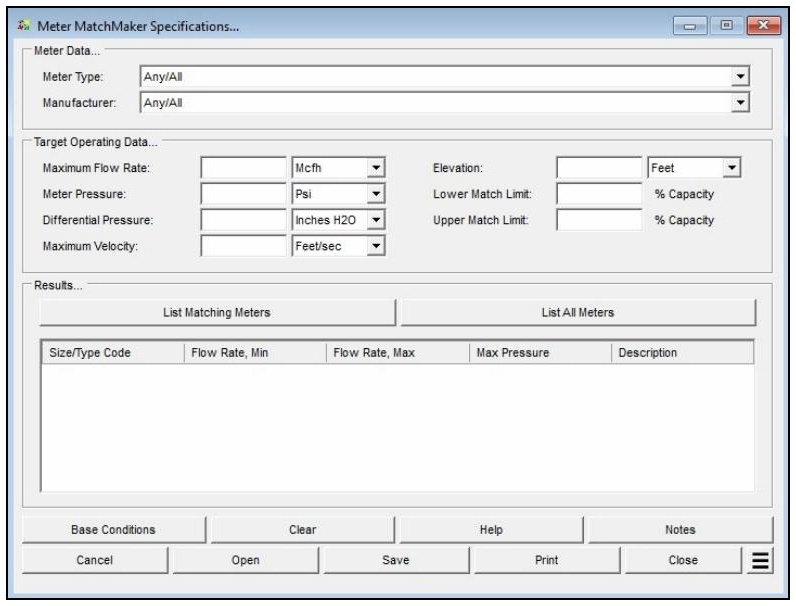
| Output | Description |
|---|---|
| Size/Type Code | The size and type code identifier for each meter remaining in the selection set after all filtering steps. |
| Flow Rate, Min | The minimum flow rate rating for the matched meter, at the specified meter pressure and base conditions. |
| Flow Rate, Max | The maximum (rated capacity) flow rate for the matched meter, at the specified meter pressure and base conditions. |
| Max Pressure | The maximum rated pressure for the matched meter, in gauge pressure. |
| Description | A text description of the matched meter from the Meter Property Table. |
FAQ
-
What information do I need before running a meter calculation?
You will need the meter size/type code (selectable from the built-in meter table), the known value for either inlet pressure or flow rate, the flowing temperature, elevation or atmospheric pressure at the meter location, and base conditions including base pressure and temperature. Gas properties — particularly specific gravity — are also required, either entered manually or loaded from a gas properties file. If compressibility corrections are needed, a compressibility factor method must also be selected in Base Conditions.
-
What is the Rated Capacity Adjustment Factor and how should I interpret it?The Rated Capacity Adjustment Factor is the ratio of the meter’s actual flowing capacity (at the specified operating conditions) to its nameplate rated capacity. A factor greater than 1.0 indicates the meter can handle more standard volume flow than its nameplate rating under the given conditions — typically because the operating pressure is higher than the rated pressure. The factor is useful for confirming that a given meter size can handle the required flow at the intended operating pressure
-
Are there any limitations or assumptions in the calculation I should be aware of?Yes. GASCalc assumes the compressibility factor at rated base conditions (Z_BR) equals 1.0 and that the rated temperature (T_R) is 60 °F. The calculator does not predict rotor speed or enforce manufacturer speed limits — exceeding the meter’s maximum rated speed can cause immediate or premature mechanical failure, so results must be checked against the manufacturer’s specifications. Additionally, there is no common consensus standard for meter sizing, so this method may differ from the approach used by a specific meter manufacturer.
-
When should I use the Meter Values calculator versus the Meter MatchMaker?Use the Meter MatchMaker when you have not yet selected a meter and need to identify which size and type best fits a given application. Once a specific meter model has been chosen, use that meter’s Values calculator to confirm or compute the flow rate or inlet pressure at defined operating conditions and to determine the Rated Capacity Adjustment Factor.