
This application calculates the volume of gas that has passed through a pulse output meter based on the cumulative pulse count recorded by the meter, along with the associated pressure and temperature adjustment factors needed to convert the uncorrected (actual) volume to a standard volume at base conditions. Supported calculation methods include the American Gas Association Report No. 7 K-Factor Method. Either the volume or the pulse count may be treated as the unknown and solved for in a given calculation.
Background
Some meter indexes, instruments, or correctors installed on a meter produce an electrical pulse as gas passes through. Each pulse corresponds to a predetermined volume measurement value. The total volume through the meter over a given period is determined by multiplying the cumulative number of pulses over that period by the associated pulse factor (K-Factor).
Generally, pulses are generated based on an uncorrected volume — that is, the volume measured at actual flowing pressure and temperature rather than at the base (standard) conditions. To obtain the standard volume, additional pressure, temperature, and compressibility adjustment factors must be applied to the pulse-determined value.
Equations
Pulse Output Meter Volume
The corrected volume at base conditions is calculated from the cumulative pulse count, meter factor, and operating conditions as follows:
Q = \left[\frac{\text{Pulse \#}}{K}\right] \times \left[\frac{P_F}{P_B}\right] \times \left[\frac{T_B}{T_F}\right] \times \left[\frac{Z_B}{Z_F}\right]Q = \left[\frac{\text{Pulse \#}}{K}\right] \times \left[\frac{P_F}{P_B}\right] \times \left[\frac{T_B}{T_F}\right] \times \left[\frac{Z_B}{Z_F}\right]
Pressure Adjustment Factor
The pressure-only adjustment factor used to convert uncorrected volume to base conditions is:
PF = \left[\frac{P_F}{P_B}\right]PF = \left[\frac{P_F}{P_B}\right]
Total Adjustment Factor
The total adjustment factor accounts for pressure, temperature, and compressibility simultaneously:
PTZ = \left[\frac{P_F}{P_B}\right] \times \left[\frac{T_B}{T_F}\right] \times \left[\frac{Z_B}{Z_F}\right]PTZ = \left[\frac{P_F}{P_B}\right] \times \left[\frac{T_B}{T_F}\right] \times \left[\frac{Z_B}{Z_F}\right]
Where:
K — Meter Factor (number of pulses per unit volume), pulses/cf
PB — Base Pressure, psia
PF — Pressure at Flowing (Metered) Conditions, psia
PF — Pressure (Only) Adjustment Factor, dimensionless
PTZ — Total (Pressure, Temperature, and Compressibility) Adjustment Factor, dimensionless
Pulse #— Cumulative Number of Pulses Output by the Meter
Q — Volume at the Specified Base Conditions, cf
TB — Base Temperature, Rankine
TF — Temperature at Flowing (Metered) Conditions, Rankine
ZB — Compressibility Factor at Specified Base Conditions, dimensionless
ZF — Compressibility Factor at Flowing (Metered) Conditions, dimensionless
PF = PFG + PATM, where PATM is Atmospheric Pressure at the Metered Location (psia) and PFG is Gauge Pressure at Flowing Conditions (psig)
Using the Adjustment Factors
The calculated adjustment factors can also be used independently to convert an uncorrected (actual) volume to a corrected standard volume. The uncorrected volume is equal to the meter factor multiplied by the number of pulse counts:
Uncorrected Volume = Pulse # / K
To obtain the corrected volume at base conditions, multiply the uncorrected volume by the appropriate adjustment factor — either PF for a pressure-only correction, or PTZ for a full pressure, temperature, and compressibility correction.
Case Guide
Part 1: Create Case
- Select the Pulse Output Meter application from the Meters Module.
- Click the Clear command button to set all values to blank (null).
- Click the Base Conditions command button. Set the Base Pressure, Base Temperature, and select or enter Gas Properties. Choose the Atmospheric Pressure Method and Compressibility Factor Method as appropriate. Click Apply to save and return.
- From the Calculation Method list, select the desired method (e.g., American Gas Association Report No. 7 — K-Factor Method).
- Click on the red label of the item to be calculated (the “unknown” value) until the label is underlined — either Volume or Pulse Count. Only one unknown may be selected at a time.
- Select the desired dimensional units for all data items.
- Enter values for all known data items: Meter Size/Type, Static Pressure, Pulse Count or Volume, Elevation, and Flowing Temperature.
- Click the Calculate command button to compute results.
Input Parameters
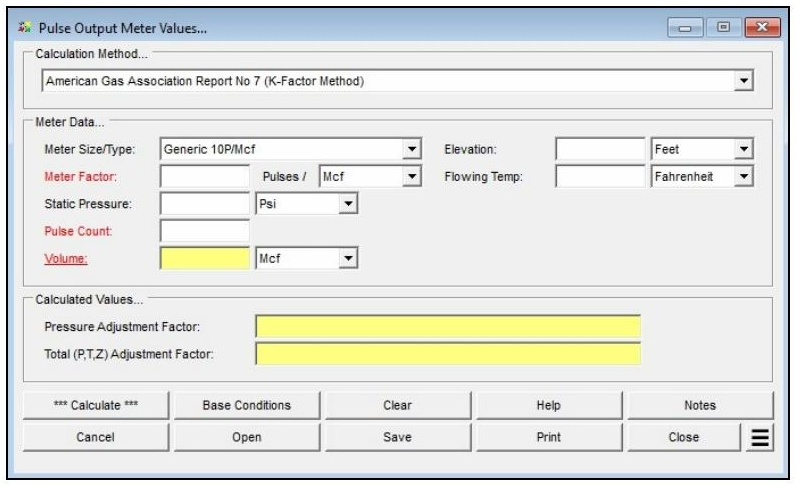
| Parameter | Description |
|---|---|
| Calculation Method | Specifies which method is used to perform the calculation. |
| Meter Size/Type | Specifies the meter Size/Type Code. |
| Meter Factor | Specifies or displays the pulse count per unit volume for the meter. Can be designated as the unknown. |
| Static Pressure | Specifies the pressure at the inlet (upstream) side of the device, in gauge pressure. |
| Pulse Count | Specifies or displays the cumulative pulse count. Can be designated as the unknown. |
| Volume | Specifies or displays the volume associated with the specified pulse count, at base conditions. Can be designated as the unknown. |
| Elevation | Specifies the height above mean sea level at the pulse meter location. Displayed only when the Atmospheric Pressure Method is not set to “None” or “None – Entered Value.” |
| Flowing Temp | Specifies the temperature of the gas flowing through the meter. |
| Compressibility Factor (Base) | Specifies the compressibility factor value for the specified base conditions. Displayed only when the Compressibility Factor Method is set to “None – Entered Values.” |
| Compressibility Factor (Flowing) | Specifies the compressibility factor value for the specified flowing conditions. Displayed only when the Compressibility Factor Method is set to “None – Entered Values.” |
| Atm Pressure | Specifies the atmospheric pressure value at the pulse meter location. Displayed only when the Atmospheric Pressure Method is set to “None – Entered Value.” |
Part 2: Outputs/Reports
- u003cliu003eIf you need to modify an input parameter, click the CALCULATE button after the change.u003c/liu003eu003cliu003eTo SAVE, fill out all required case details then click the SAVE button.u003c/liu003eu003cliu003eTo rename an existing file, click the SAVE As button. Provide all case info then click SAVE.u003c/liu003eu003cliu003eTo generate a REPORT, click the REPORT button.u003c/liu003eu003cliu003eThe user may export the Case/Report by clicking the Export to Excel icon.u003c/liu003eu003cliu003eTo delete a case, click the DELETE icon near the top of the widget.u003c/liu003e
Results
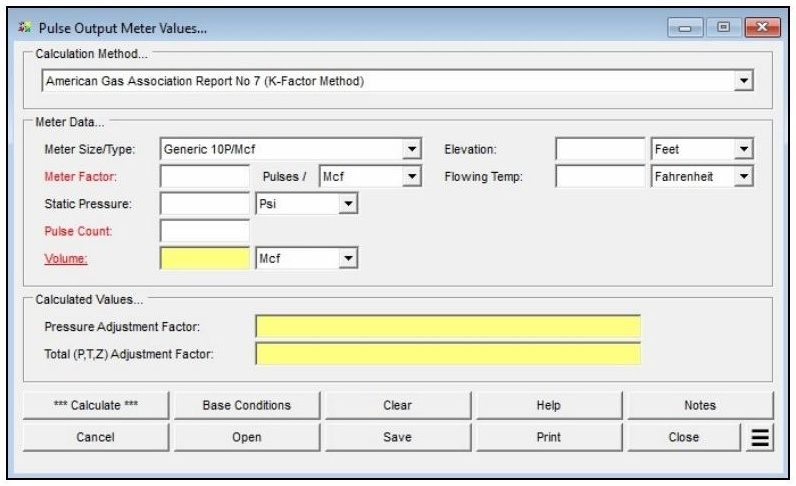
| Output | Description |
|---|---|
| Meter Factor | The pulse count per unit volume for the selected meter (pulses/Mcf or pulses/m3). Displayed when Meter Factor is the calculated unknown, or auto-populated from the Meter Property Table when a Size/Type is selected. |
Pulse Count | Specifies or displays the cumulative pulse count. Can be designated as the unknown. |
| Volume | The calculated volume at the specified base conditions associated with the entered pulse count (Mcf or m3). Displayed when Volume is the calculated unknown. |
| Pressure Adjustment Factor | The pressure-only multiplication factor (PF = PF / PB), used to convert uncorrected volume to base conditions. Dimensionless. |
| Total (P,T,Z) Adjustment Factor | The total adjustment factor accounting for pressure, temperature, and compressibility simultaneously. Dimensionless. |
References
- American Gas Association — Measurement of Natural Gas by Turbine Meters, Report No. 7, 2006.
FAQ
-
What information do I need before running a meter calculation?
You will need the meter size/type code (selectable from the built-in meter table), the known value for either inlet pressure or flow rate, the flowing temperature, elevation or atmospheric pressure at the meter location, and base conditions including base pressure and temperature. Gas properties — particularly specific gravity — are also required, either entered manually or loaded from a gas properties file. If compressibility corrections are needed, a compressibility factor method must also be selected in Base Conditions.
-
What is the Rated Capacity Adjustment Factor and how should I interpret it?The Rated Capacity Adjustment Factor is the ratio of the meter’s actual flowing capacity (at the specified operating conditions) to its nameplate rated capacity. A factor greater than 1.0 indicates the meter can handle more standard volume flow than its nameplate rating under the given conditions — typically because the operating pressure is higher than the rated pressure. The factor is useful for confirming that a given meter size can handle the required flow at the intended operating pressure
-
Are there any limitations or assumptions in the calculation I should be aware of?Yes. GASCalc assumes the compressibility factor at rated base conditions (Z_BR) equals 1.0 and that the rated temperature (T_R) is 60 °F. The calculator does not predict rotor speed or enforce manufacturer speed limits — exceeding the meter’s maximum rated speed can cause immediate or premature mechanical failure, so results must be checked against the manufacturer’s specifications. Additionally, there is no common consensus standard for meter sizing, so this method may differ from the approach used by a specific meter manufacturer.
-
When should I use the Meter Values calculator versus the Meter MatchMaker?Use the Meter MatchMaker when you have not yet selected a meter and need to identify which size and type best fits a given application. Once a specific meter model has been chosen, use that meter’s Values calculator to confirm or compute the flow rate or inlet pressure at defined operating conditions and to determine the Rated Capacity Adjustment Factor.